Free Commercial Construction Estimate Excel Template
Professional, customizable Excel estimate template with built-in item library for commercial construction. Create accurate takeoffs, manage line items, and generate detailed cost breakdowns instantly. Download free or use Erro to automate your estimating workflow.
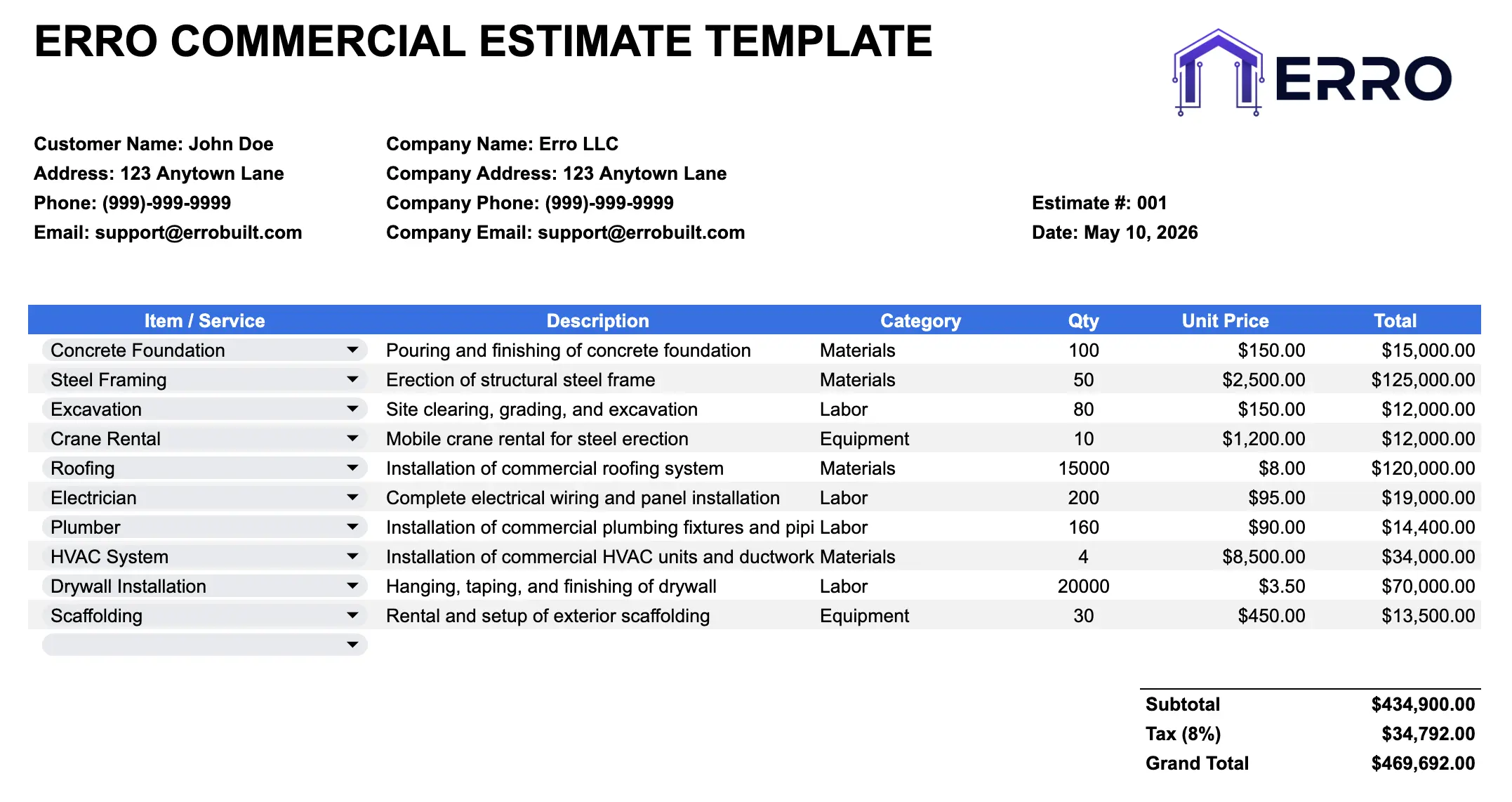
What is a Commercial Construction Estimate?
A commercial construction estimate is a detailed cost projection that quantifies materials, labor, equipment, and services for building projects. This Excel template streamlines the estimation process with a pre-built item library, allowing contractors to quickly select, modify, and calculate project costs with precision.
When to Use This Estimate Template
Creating detailed material and labor takeoffs for commercial projects
Comparing cost variations across multiple project scenarios
Managing a reusable library of construction items and pricing
Generating consistent, professional estimates across your team
Tracking material quantities and unit costs over time
What's Included
Core Estimate Sections
Project details and client information
Pre-populated item library with common construction materials and labor
Itemized line items with quantity, unit, and rate fields
Automatic cost calculations (quantity × rate)
Subtotal, tax, and contingency calculations
Summary sheet with total project cost
Notes and specifications section
Advanced Features
Customizable item library organized by trade (framing, electrical, plumbing, etc.)
Multiple estimate worksheets for comparison
Formulas for automatic recalculation when quantities change
Markup and profit margin calculations
Cost tracking by phase or section
How to Use This Commercial Construction Estimate Template
Step 1: Enter Project & Client Information
Fill in project name, address, client details, and estimate date. Add your company information and reference numbers.
Step 2: Access the Item Library
Browse the pre-built item library containing common construction materials, labor rates, and equipment. Select items relevant to your project.
Step 3: Add Line Items to Your Estimate
Input quantity, unit of measure, and rate for each item. Formulas automatically calculate extended costs. Add custom items as needed.
Step 4: Adjust Quantities & Rates
Modify quantities based on project scope and adjust unit rates for your market. The template recalculates totals automatically.
Step 5: Review & Export
Review the estimate summary, verify calculations, and export as Excel. Share with clients or import into your project management system.
Pro Tips for Accurate Construction Estimates
Build Your Item Library
Customize the item library with your actual labor rates, supplier pricing, and preferred materials. Accurate baseline data improves estimate precision.
Use Historical Data
Reference past projects to refine material quantities and labor hours. Track estimate vs. actual costs to continuously improve accuracy.
Include Contingency
Add 5-10% contingency for unforeseen conditions and material price fluctuations. Make it a line item so clients understand the buffer.
Update Rates Regularly
Monitor market pricing and labor costs. Update your item library quarterly to ensure estimates remain competitive and profitable.
Construction Estimate Examples & Templates
Commercial Office Build-Out & Renovation Estimates
Retail & Tenant Improvement Cost Projections
Warehouse & Industrial Facility Estimates
Healthcare & Medical Office Construction Takeoffs
Construction Estimate Template FAQs
Yes. Edit the item library sheet to add your company's standard materials, labor rates, and equipment costs. Save for future estimates.
Yes. The template includes multiple estimate worksheets. Create different scenarios with varying quantities or rates to compare costs.
Preliminary estimates are typically ±20% accurate. Detailed takeoff estimates should be ±5-10% with accurate material pricing and labor data.