Free General Contractor Estimate Template for Excel
Streamline your bidding process with our free contractor estimate template. Built-in item library, automated calculations, and professional formatting help you create accurate estimates in minutes and win more projects.
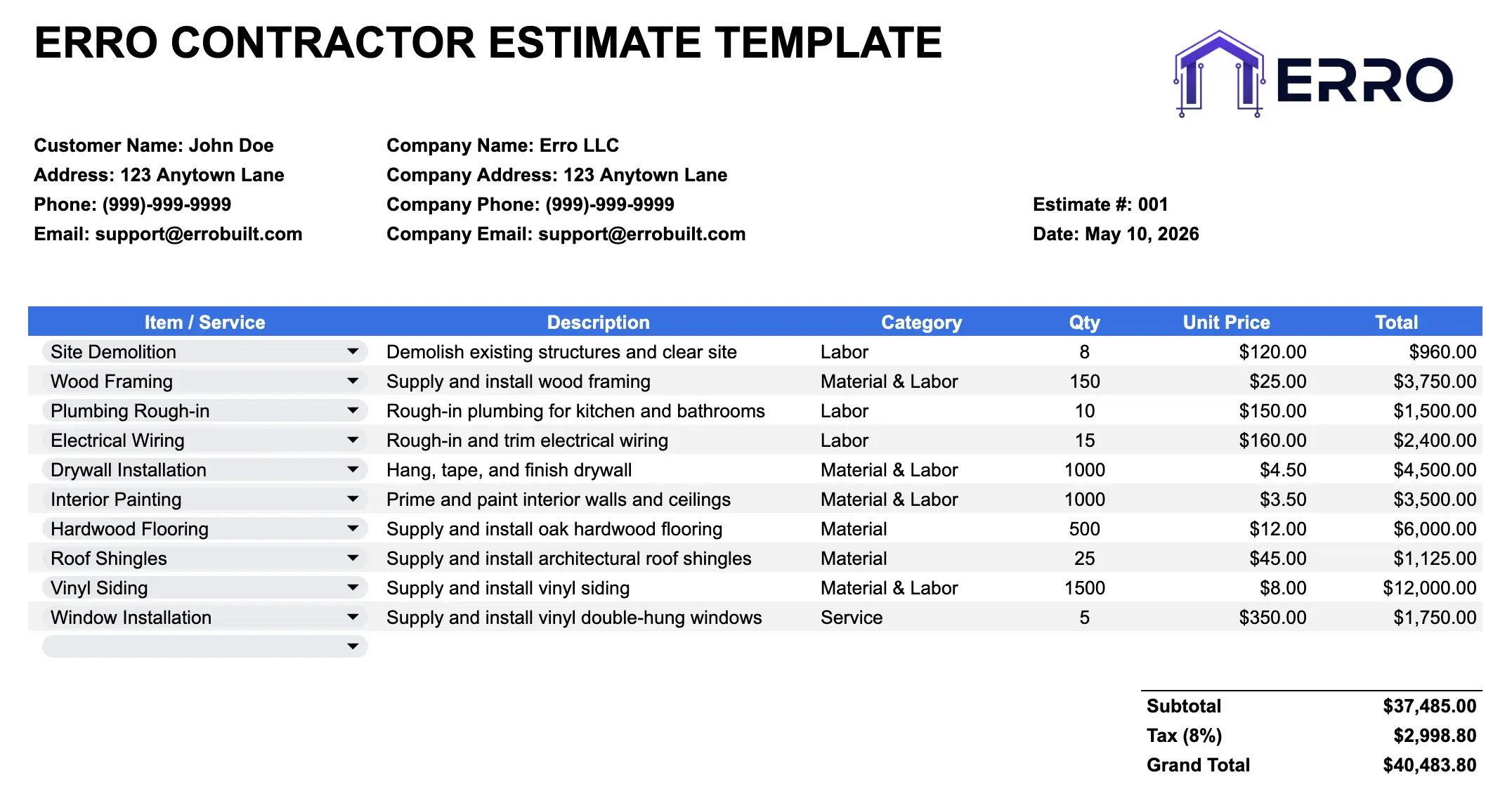
What is a Contractor Estimate Template?
A contractor estimate template is a spreadsheet tool that calculates project costs quickly and accurately. It combines an item library for common materials and labor rates with a customizable estimate section, helping you quote jobs faster, maintain consistency, and reduce pricing errors.
When to Use a Contractor Estimate Template
Responding to job inquiries with quick price quotes
Comparing costs across multiple material suppliers
Reusing common line items from past projects
Tracking labor hours and material expenses per job
What's Inside This Contractor Estimate Template
Core Features
Pre-built item library with common materials and labor rates
Dropdown selectors for quick item selection
Automated quantity and pricing calculations
Project details and client information section
Itemized cost breakdown with labor and materials
Subtotal, tax, and grand total calculations
Professional formatting for printing and sharing
Advanced Capabilities
Custom markup percentage application
Multiple tax rate support by location
Notes section for special conditions or discounts
Company branding header with logo space
Estimate number and date tracking
Easy export to CSV or PDF formats
How to Use This Contractor Estimate Template
Step 1: Set Up Your Item Library
Add your common materials, labor rates, and equipment to the item library tab. Include unit costs and descriptions for quick selection.
Step 2: Enter Project and Client Information
Fill in the client name, project address, estimate date, and estimate number. Add your company details and contact information.
Step 3: Select Items from Your Library
Use the dropdown menu to select items. Quantities and pricing automatically populate from your library.
Step 4: Adjust Quantities and Add Custom Items
Modify quantities as needed for the specific job. Add one-off items directly to the estimate if not in your library.
Step 5: Review and Export Your Estimate
Check totals, apply your markup percentage, and export as PDF or share as CSV with clients and team members.
Pro Tips for Better Contractor Estimates
Build a Comprehensive Item Library
The more items you add, the faster you'll create estimates. Include seasonal rates and regional supplier variations.
Update Prices Regularly
Review material and labor costs quarterly. Accurate, current pricing protects your margins and credibility.
Use Markup Strategically
Apply consistent markup percentages by project type. Separate labor and material markups for better profit control.
Track Estimate to Invoice Ratios
Compare final invoices to estimates. Identify areas of cost overrun and adjust future estimates accordingly.
Contractor Services Using This Estimate Template
Home Renovation and Remodeling Estimates
Construction Labor and Material Bidding
Plumbing and Electrical Service Quotes
Roofing and Exterior Work Estimates
Contractor Estimate Template FAQs
Yes. Use the CSV import feature to populate your item library from your accounting software or previous estimates.
Add custom items directly to the estimate row. They won't be saved to the library, but you can edit the library later to include them.
Absolutely. Override line item prices or adjust the overall markup percentage for seasonal pricing or client-specific quotes.
Most templates include a formula to convert estimates to invoices automatically or you can reference the estimate number when creating the invoice.