Free Custom Home Estimate Template for Excel
Create accurate construction estimates in minutes with our customizable Excel template. Features built-in item library, automated calculations, and professional formatting. Speed up your bidding process and win more projects.
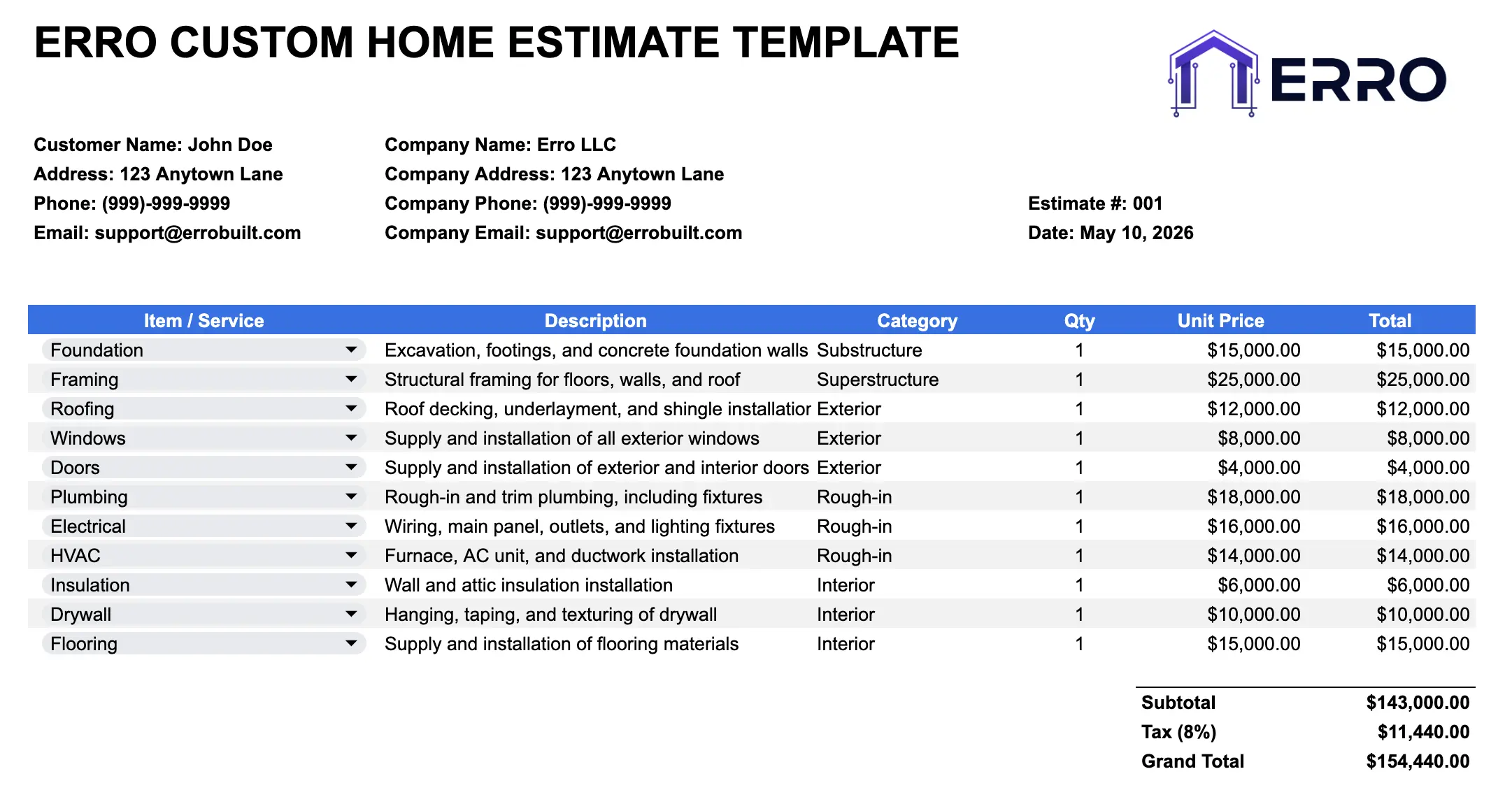
Construction Estimate Template Explained
A construction estimate template is a preformatted spreadsheet designed to help builders and contractors quickly calculate project costs. It includes an organized item library for common materials and labor, automated pricing formulas, and sections for client details—saving time and reducing errors.
When Contractors Use This Estimate Template
Preparing accurate cost estimates for client bids
Selecting items from your pre-built material and labor library
Calculating totals and profit margins automatically
Maintaining consistent pricing across multiple estimates
Template Components & Features
Essential Sections
Client and project information header
Item library with descriptions and unit costs
Estimate line items with quantities and totals
Labor and material cost breakdowns
Subtotal, tax, and grand total calculations
Notes and terms section
Professional formatting and branding area
Professional Features
Pre-populated item library for fast selection
Automated formulas for accurate calculations
Customizable columns for your workflow
Easy CSV export for additional processing
Estimate number and date tracking
Margin and markup adjustment fields
Print-ready layout
How to Use This Estimate Template (Step-by-Step)
Step 1: Enter Project Details
Fill in your company name, logo area, client name, project address, date, and estimate number.
Step 2: Browse the Item Library
Review the included item library tab with pre-set materials and labor costs. Add your own custom items for specialized work.
Step 3: Select Line Items
Choose items from the library and enter quantities needed. Reference item codes for consistency across estimates.
Step 4: Adjust Pricing
Modify unit costs as needed for seasonal pricing or bulk discounts. Set your markup percentage for automatic profit calculations.
Step 5: Review & Export
Check the totals, review formatting, then save as PDF or CSV. Share with clients or import into your accounting system.
Pro Tips for Accurate Estimates
Maintain Your Item Library
Update material costs quarterly and add new items as your business grows—consistency saves time on every estimate
Use Item Codes
Assign codes to each library item (e.g., FRAMING-2X4) for faster selection and easier tracking
Include Contingency
Add a contingency line item (5–10% of subtotal) to account for unexpected costs or change orders
Export to CSV
Save as CSV for easy import into accounting software, CRM tools, or project management platforms
Example Use Cases
Residential construction and renovation estimates
Commercial building projects
Remodeling and repair work
Electrical, plumbing, and HVAC bidding
Frequently Asked Questions
Edit the item library tab, enter the item name, description, unit of measure, and cost. Save and reference it in future estimates.
Yes! The template uses standard Excel functions. Add or modify columns to fit your specific workflow and pricing structure.
Yes. The template includes a tax row—just enter your tax rate and it calculates automatically based on your subtotal.
Yes! Save as CSV format for seamless import into accounting, CRM, or project management software.
Enter your desired markup percentage in the designated field. The template calculates profit margin automatically.