Free Electrical Estimate Calculator Template for Excel
Build accurate electrical estimates with our customizable Excel estimate template. Features an integrated item library and automated cost calculations for material takeoffs, labor rates, and project totals.
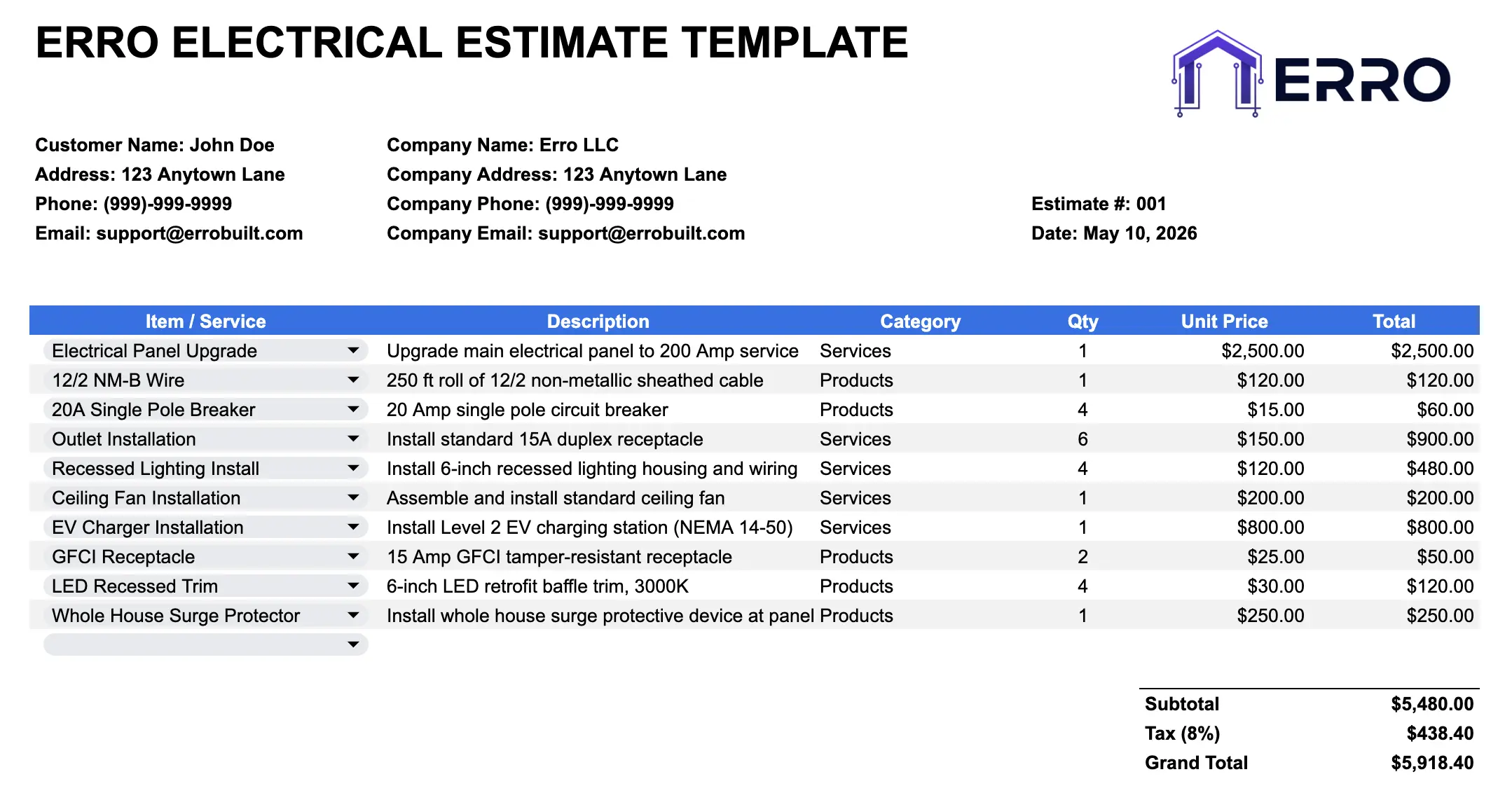
What is an Electrical Estimate Calculator?
An electrical estimate calculator is a spreadsheet tool that helps contractors quickly generate accurate project quotes. It combines a pre-populated item library with customizable line items to calculate material costs, labor hours, and total project pricing in minutes.
When to Use an Electrical Estimate Spreadsheet
Generating fast residential electrical quotes
Comparing material suppliers and pricing
Tracking labor hours and equipment costs
Creating detailed material takeoffs
Automated project cost summaries
Estimate Template Features
Core Components
Pre-built item library with common electrical materials
Labor rate calculator by task type
Automated formulas for subtotals and markups
Equipment rental pricing section
Material quantity and unit price fields
Tax and fee calculations
Project total summary sheet
Advanced Features
Custom item library for specific inventory
Supplier cost tracking and comparisons
Margin and markup percentage controls
Discount application fields
CSV import/export functionality
Multi-project consolidation
How to Use the Electrical Estimate Template
Step 1: Set Up Your Business Rates
Enter your standard labor rates, overhead percentages, and markup targets in the settings tab. Configure pricing by electrical service type.
Step 2: Select from Item Library
Choose pre-loaded electrical materials and labor tasks from the library. Filter by category: wiring, panels, outlets, fixtures, labor, permits.
Step 3: Enter Project Details
Add quantities and adjust unit prices for each line item. The template auto-calculates extended costs and material subtotals.
Step 4: Review Automated Calculations
Formulas compute labor hours, material totals, markups, and final project pricing. Adjust percentages as needed for competitiveness.
Step 5: Export and Share
Export as PDF for client proposals or keep as CSV for internal tracking. Use data for future project comparisons.
Tips for Faster Electrical Estimates
Maintain Updated Item Library
Regularly update material costs and supplier pricing to keep estimates competitive and accurate
Use CSV Bulk Import
Import material lists from suppliers directly into the template to save time on data entry
Create Templates by Project Type
Save pre-configured estimates for common projects like panel upgrades or rewiring to streamline quoting
Track Historical Data
Archive completed estimates to analyze pricing trends and improve future quote accuracy
Common Electrical Estimate Uses
Quick residential rewiring cost breakdowns
Commercial panel upgrade pricing
Material takeoff calculations for vendors
Labor cost forecasting by project phase
Supplier price comparison analysis
Electrical Estimate Template FAQs
Yes, the template allows unlimited custom items. Add materials, labor tasks, or equipment with your own pricing and descriptions.
Absolutely. Export data as CSV for easy sharing with team members or importing into other business systems.
Edit prices directly in the item library sheet. All estimates using those items auto-update with new costs.
Yes, the template includes fields for percentage-based markups, discounts, and custom adjustments per line item or project-wide.