Free HVAC Estimate Template Excel with Item Library
Build accurate HVAC estimates instantly with our free Excel template. Features a pre-loaded item library for equipment and labor costs, customizable cost calculations, and professional formatting for faster quoting.
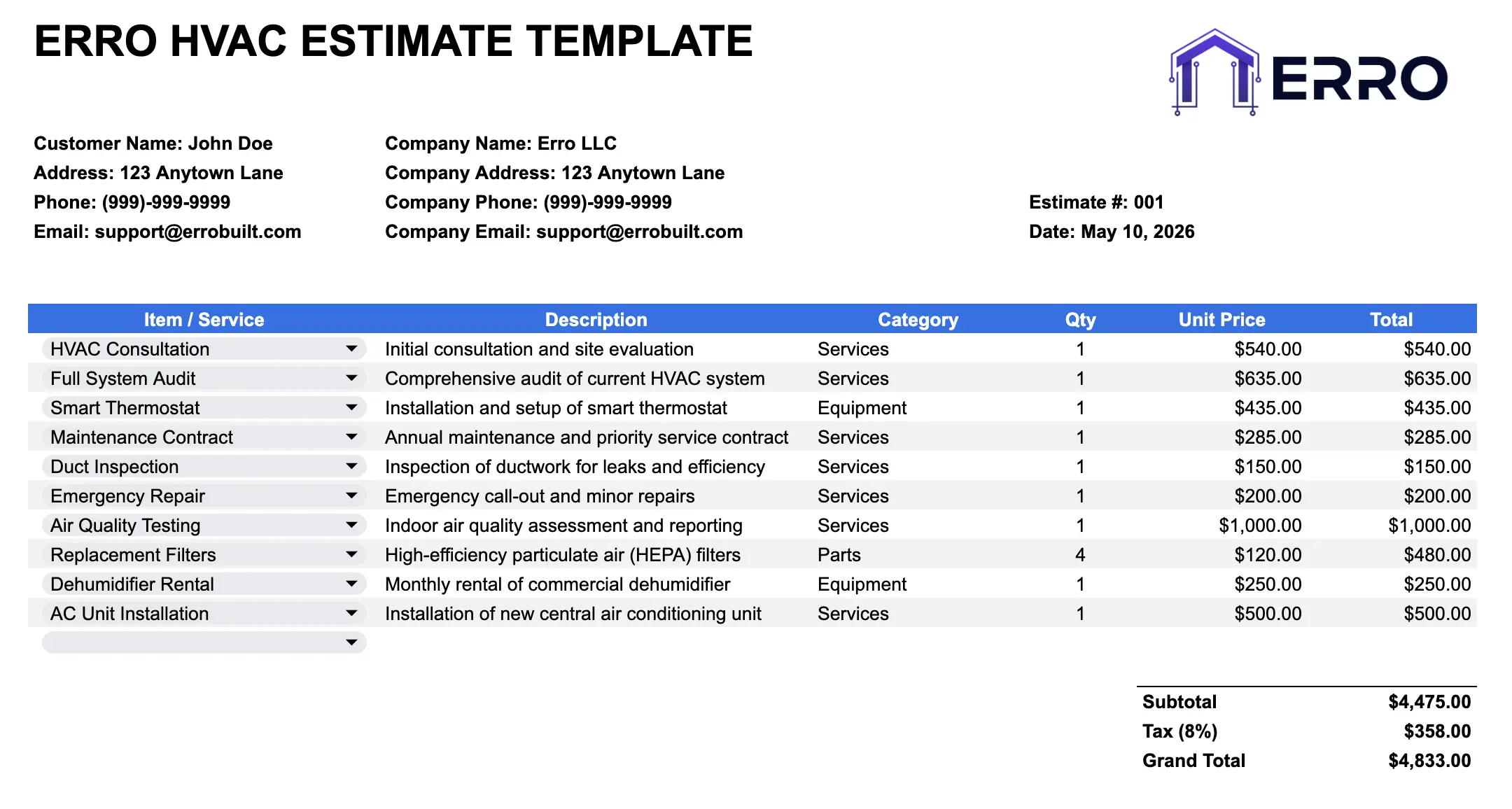
What is an HVAC Estimate Template?
An HVAC estimate template is a spreadsheet solution designed for contractors to quickly calculate and organize equipment, labor, and material costs. With built-in item libraries and automated pricing calculations, you can generate professional estimates in seconds—no manual math required.
When to Use This HVAC Estimate Template
Creating itemized equipment and installation cost breakdowns
Calculating labor hours and material expenses accurately
Standardizing pricing across multiple technicians and teams
Bulk importing estimates from your item library into proposals
What's Included in This HVAC Estimate Template
Core Sections
Pre-built item library with common HVAC equipment and services
Line-item estimate section for adding labor and materials
Automated cost calculation and total pricing formulas
Tax calculation fields for accurate quoting
Client project details and estimate metadata
Equipment specifications reference guide
Professional Features
Sortable item library by category (equipment, labor, materials)
Unit price and quantity fields for flexible cost entry
Subtotal, tax, and final price auto-calculations
CSV export for easy data sharing and backup
Branded header with company logo space
Estimate number and date tracking columns
How to Use This HVAC Estimate Template (Step-by-Step)
Step 1: Set Up Your Item Library
Populate the library sheet with your standard HVAC equipment, labor rates, and material costs. Include unit prices and item descriptions for quick reference.
Step 2: Enter Project Details
Fill in the estimate header with client name, project address, date, and estimate ID for organization and tracking.
Step 3: Add Line Items from Library
Copy equipment and labor items from your library into the estimate section. Adjust quantities and unit prices as needed.
Step 4: Review Calculations
Verify that subtotals, taxes, and final amounts calculate correctly. The template auto-sums all line items for accuracy.
Step 5: Export & Share
Save as CSV or Excel, export to PDF for client delivery, or import into your proposal software for final formatting.
Pro Tips for Accurate HVAC Estimates
Organize Your Item Library
Group items by category (furnaces, AC units, labor types) to speed up estimate creation and reduce data entry errors
Include Material Waste Factor
Add 5-10% to material quantities for ductwork, refrigerant, and supplies to account for typical job site waste
Set Competitive Labor Rates
Research local HVAC labor rates and adjust your hourly costs by technician experience level and job complexity
Use CSV Format for Data Integration
Export estimates as CSV to integrate with accounting software, CRM systems, or bulk proposal generation tools
Common HVAC Estimate Scenarios
Residential furnace and AC installation cost breakdowns
Commercial HVAC system replacements and upgrades
Ductless mini-split equipment and labor estimates
HVAC maintenance contract pricing and labor hour estimates
HVAC Estimate Template Questions
Edit the library sheet with your equipment brands, models, labor rates, and material costs. Save changes to use for all future estimates.
Yes—the template includes tax calculation fields that apply a percentage to subtotals. Adjust the tax rate for your region.
Open the Excel file and use Save As > CSV format. This creates a comma-separated file compatible with most business software.
Absolutely. Copy and paste library items into each estimate sheet, then adjust quantities and prices per project.