Free Kitchen Remodel Estimate Template for Excel
Build accurate kitchen renovation estimates with our customizable Excel template. Features pre-loaded item library, automatic calculations, and professional formatting for contractors.
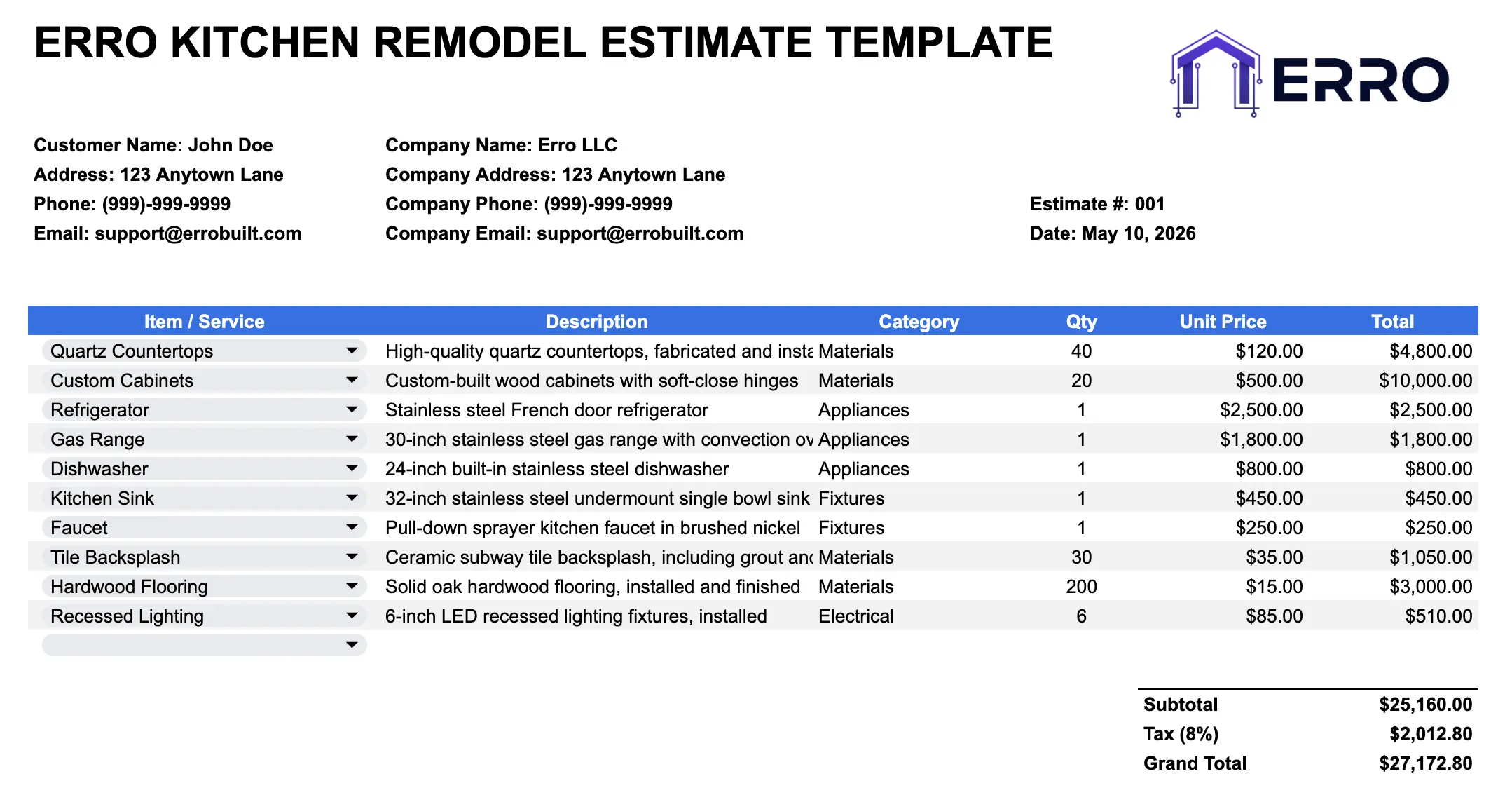
What is a Kitchen Remodel Estimate Template?
A kitchen remodel estimate template is a spreadsheet tool that combines a comprehensive item library with calculation fields to quickly generate accurate cost estimates. Perfect for contractors managing material pricing, labor rates, and project totals efficiently.
When to Use This Kitchen Estimate Excel Template
Creating quick kitchen renovation cost estimates from site visits
Comparing material options and pricing alternatives
Building detailed line-item breakdowns for client approval
Maintaining consistent pricing across your contracting business
Tracking material costs and labor rates by project type
What's Included in This Estimate Template
Core Sections
Pre-populated item library (cabinets, countertops, flooring, appliances, labor)
Customizable unit costs and quantities
Automatic subtotal, tax, and grand total calculations
Project details and homeowner information fields
Material categories with filterable selections
Labor rate inputs with time estimation fields
Professional Features
Color-coded sections for easy data entry
Formula-driven calculations eliminating manual math errors
Export-ready formatting for PDF or email distribution
Margin and markup calculation fields
Notes column for material specifications and options
Summary page for quick client review
How to Create Accurate Kitchen Remodel Estimates
Step 1: Fill in Project Information
Enter homeowner name, kitchen address, project date, and scope of work at the top of your estimate spreadsheet.
Step 2: Select Materials from the Item Library
Choose pre-configured kitchen items from the dropdown library: cabinetry styles, countertop materials, flooring options, and appliances with standard pricing.
Step 3: Enter Quantities and Adjust Pricing
Input quantities for each item and update unit costs as needed. The template automatically calculates line totals and section subtotals.
Step 4: Add Labor Costs
Include labor rates for demolition, installation, finishing, and any specialty work. Input hours or rates to auto-calculate labor subtotals.
Step 5: Review and Export
Check final totals, add markup percentage if needed, then export as PDF or CSV for client delivery or proposal attachment.
Pro Tips for Kitchen Remodel Estimates
Use the Item Library Efficiently
Regularly update your pre-built item library with current material prices and supplier costs to generate faster, more accurate estimates
Include Contingency
Add a contingency line item (typically 5-10%) to account for unexpected issues like hidden damage or code updates
Separate Material and Labor
Keep material costs and labor charges in distinct sections for transparency and easier client negotiations
Save Version History
Maintain dated backup copies of your estimates for reference and to track how your pricing evolves over time
Kitchen Estimate Template Use Cases
Quick estimates for initial client consultations
Detailed cost breakdowns for large renovation projects
Comparative estimates showing multiple material options
Labor and material separation for client requests
Kitchen Estimate Template FAQs
Yes! The item library is fully editable. Add, remove, or modify items to match your standard material options and pricing.
Absolutely. All formulas are pre-built to instantly calculate line items, subtotals, taxes, and grand totals as you enter data.
Simply use your spreadsheet's 'Export as PDF' function or print to PDF. The template formatting is optimized for professional-looking documents.
Yes, this template works in Excel, Google Sheets, and most CSV-compatible spreadsheet programs. Download the version that fits your workflow.