Free Roofing Estimate Template for Excel | Contractor Tool
Build accurate roofing estimates with our free Excel template. Features built-in item library, cost calculator, and customizable sections. Create detailed estimates faster and bid more competitively.
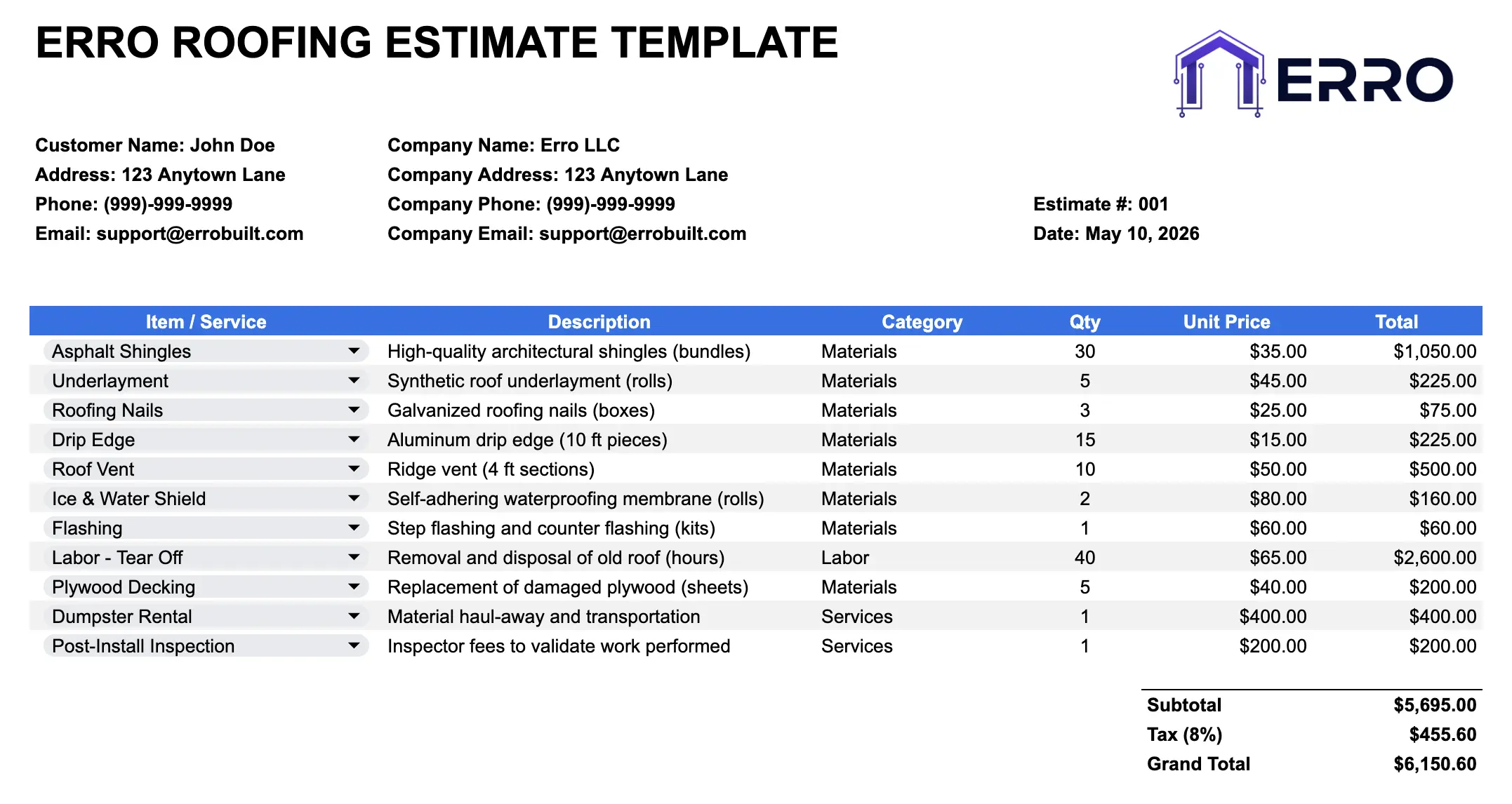
What is a Roofing Estimate Template?
An estimate template for roofers is a spreadsheet tool that calculates material costs, labor, and total project pricing. This Excel template streamlines the estimating process with pre-built formulas and an organized item library for fast, accurate bidding.
When to Use This Roofing Estimate Spreadsheet
Quickly calculating roofing material and labor costs
Building estimates with your existing item library
Comparing pricing across multiple roofing scenarios
Creating consistent estimates across your crew
Exporting estimates to proposals or invoices
What's Included in This Roofing Estimate Calculator
Core Sections
Pre-built item library (shingles, underlayment, labor, etc.)
Line-item estimate builder with quantity & pricing
Automatic cost calculations and tax fields
Project summary with material vs. labor breakdown
Subtotal, markup, and total project cost
Notes section for scope details
Professional Features
Customizable item library for your roofing services
CSV export for data management and backup
Formula-driven calculations to reduce errors
Company branding header and footer
Multiple estimate templates (repair, replacement, inspection)
Quick reference pricing for common roofing materials
How to Create a Roofing Estimate (Step-by-Step)
Step 1: Enter Project & Client Details
Fill in client name, property address, roof type, and inspection date in the header section.
Step 2: Select Items from the Library
Choose materials and labor from the pre-populated item library. Add quantities based on roof size and scope.
Step 3: Customize Pricing
Update unit prices to match your current supplier costs and labor rates. Template automatically calculates line totals.
Step 4: Add Project Notes & Conditions
Include roof pitch, weather considerations, permits, or debris removal in the notes section.
Step 5: Review Totals & Export
Check subtotal, apply markup percentage, and export as PDF or CSV for sending to clients or importing into accounting software.
Pro Tips for Accurate Roofing Estimates
Update Item Library Regularly
Keep material prices and labor rates current in your library to maintain accurate estimates.
Use Consistent Markup
Apply your standard profit margin (20–30%) for all estimates to ensure profitability.
Document All Scope Items
Include permits, inspections, disposal, and cleanup in the estimate—don't leave money on the table.
Leverage CSV for Integration
Export estimates as CSV to sync with accounting software, CRM, or project management tools.
Roofing Estimate Types Covered
Residential Roof Repair Estimates
Full Roof Replacement Calculations
Commercial Roofing Project Estimates
Emergency Leak Repair Quotes
Material-Only vs. Full Service Estimates
Roofing Estimate Template FAQs
Yes, the Excel template lets you add, remove, or update any roofing materials and labor items to match your services.
Yes, built-in formulas calculate line totals, subtotals, and apply markup percentages automatically.
Yes, save the estimate as CSV to import into accounting software, CRM systems, or share with team members.
The library includes asphalt shingles, metal roofing, underlayment, flashing, nails, labor rates, and disposal fees.