Return to All Articles
Article Sections
1. Getting Started
2. Leads
3. Library
4. Sales Template
5. Estimate
6. Proposal
7. Invoice
8. Change Order
9. Organization Management
10. Team Management
Turn On Internal Approvals
Learn what Internal Approvals are and how to enable them.
By Erro Support | 01/25/2026
1. What Are Internal Approvals?
Internal Approvals is a feature that allows you to manage who can approve certain actions within your team. For example, with Internal Approvals enabled, you can give some team members permissions to do tasks such as Creating an Estimate or Creating a Proposal however, before it can be sent to a client, it must be approved by another user who has been given the 'Approve Estimates' or 'Approve Proposals' permission. This helps ensure that all estimates and proposals are reviewed for accuracy and completeness before being sent to clients.
2. Open Team Settings
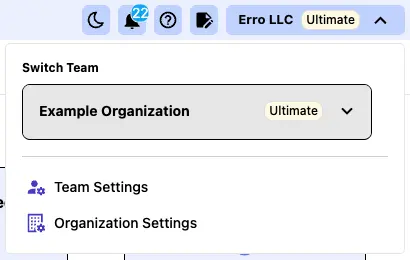
From any page within the Erro app, click on the organization name that you are currently viewing in the top left corner. This will open a dropdown menu where you can select 'Team Settings' to view team settings.
3. Click the 'Other' Tab
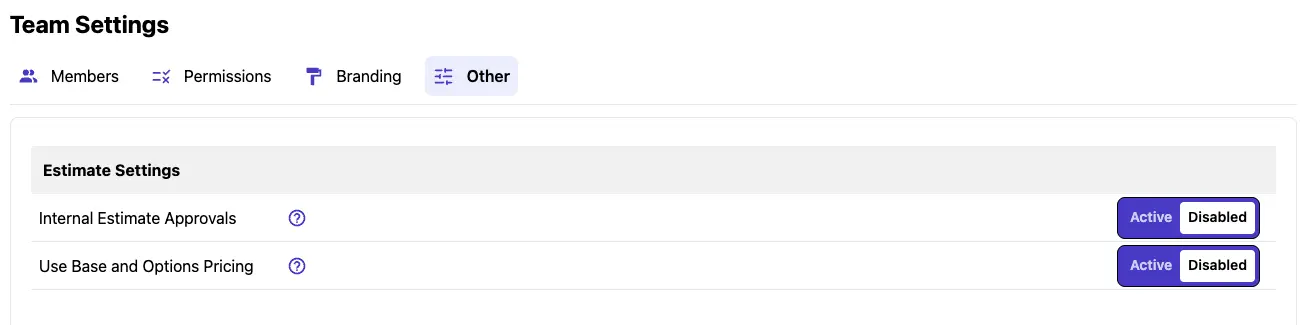
Click on the 'Other' tab within the Team Settings to access additional options.
4. Switch 'Internal Estimate Approvals' On
To enable Internal Approvals for estimates, toggle the 'Internal Estimate Approvals' switch. This will require estimates to be approved by authorized team members before they can be sent to clients.

5. Update Role Permissions to Reflect Internal Approvals
Make sure to update the permissions for each role in your team to reflect the new internal approval requirements. Assign the 'Approve Estimates' or 'Approve Proposals' permissions to the appropriate team members who will be responsible for approving these actions. For more information on updating role permissions, refer to the 'Manage Team Roles and Permissions' article.
Other Team Management Articles
Explore more articles to help you get the most out of Erro.
Manage Team Permissions
Learn how to manage team permissions and roles.

Erro Support
Manage Team Members
Learn how to add and remove people from your team.
Erro Support
Manage Team Details
Learn how to customize your team details and add branding information.
Erro Support
Turn On Base and Options Pricing
Learn what Base and Options Pricing is and how to enable it.
Erro Support