Return to All Articles
Article Sections
1. Getting Started
2. Leads
3. Library
4. Sales Template
5. Estimate
6. Proposal
7. Invoice
8. Change Order
9. Organization Management
10. Team Management
Turn On Base and Options Pricing
Learn what Base and Options Pricing is and how to enable it.
By Erro Support | 01/25/2026
1. What is Base and Options Pricing?
Use Base and Options pricing in Templates and Estimates with this option. Base pricing is used to show the base price of an item, while Options pricing allows for additional costs to be added based on selected options and quantities.
2. Open Team Settings
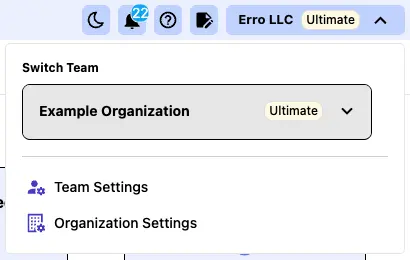
From any page within the Erro app, click on the organization name that you are currently viewing in the top left corner. This will open a dropdown menu where you can select 'Team Settings' to view team settings.
3. Click the 'Other' Tab
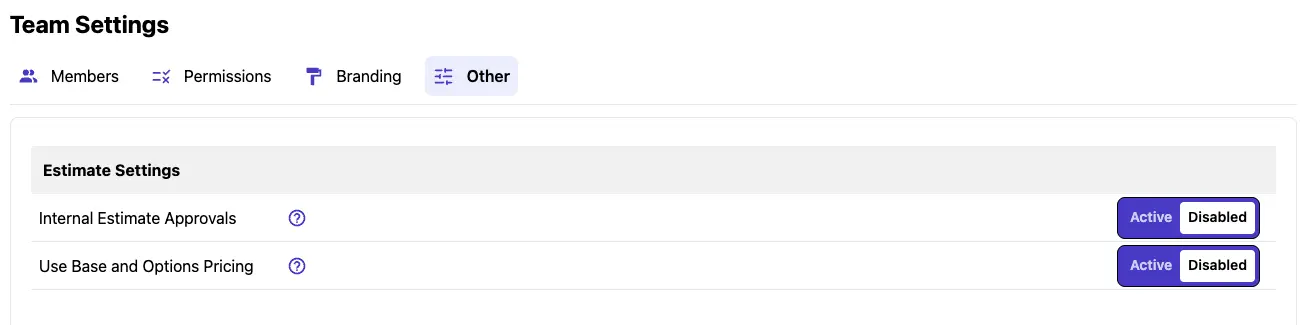
Click on the 'Other' tab within the Team Settings to access additional options.
4. Switch 'Use Base and Options Pricing' On
To enable Base and Options Pricing for estimates, toggle the 'Use Base and Options Pricing' switch. This will allow you to show the base price of an item and add additional costs based on selected options and quantities.

Other Team Management Articles
Explore more articles to help you get the most out of Erro.
Manage Team Permissions
Learn how to manage team permissions and roles.

Erro Support
Manage Team Members
Learn how to add and remove people from your team.
Erro Support
Manage Team Details
Learn how to customize your team details and add branding information.
Erro Support
Turn On Internal Approvals
Learn what Internal Approvals are and how to enable them.
Erro Support